
Sol logoSol Helps
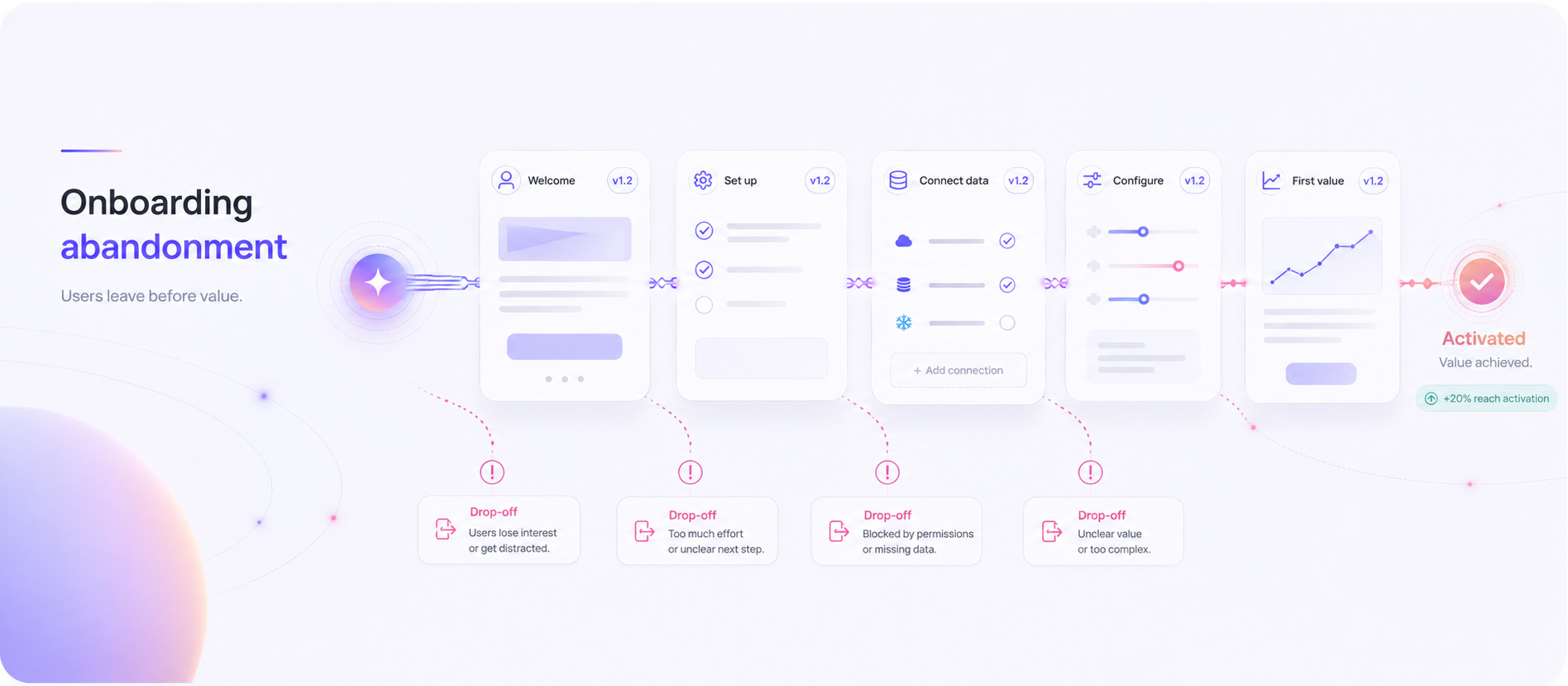
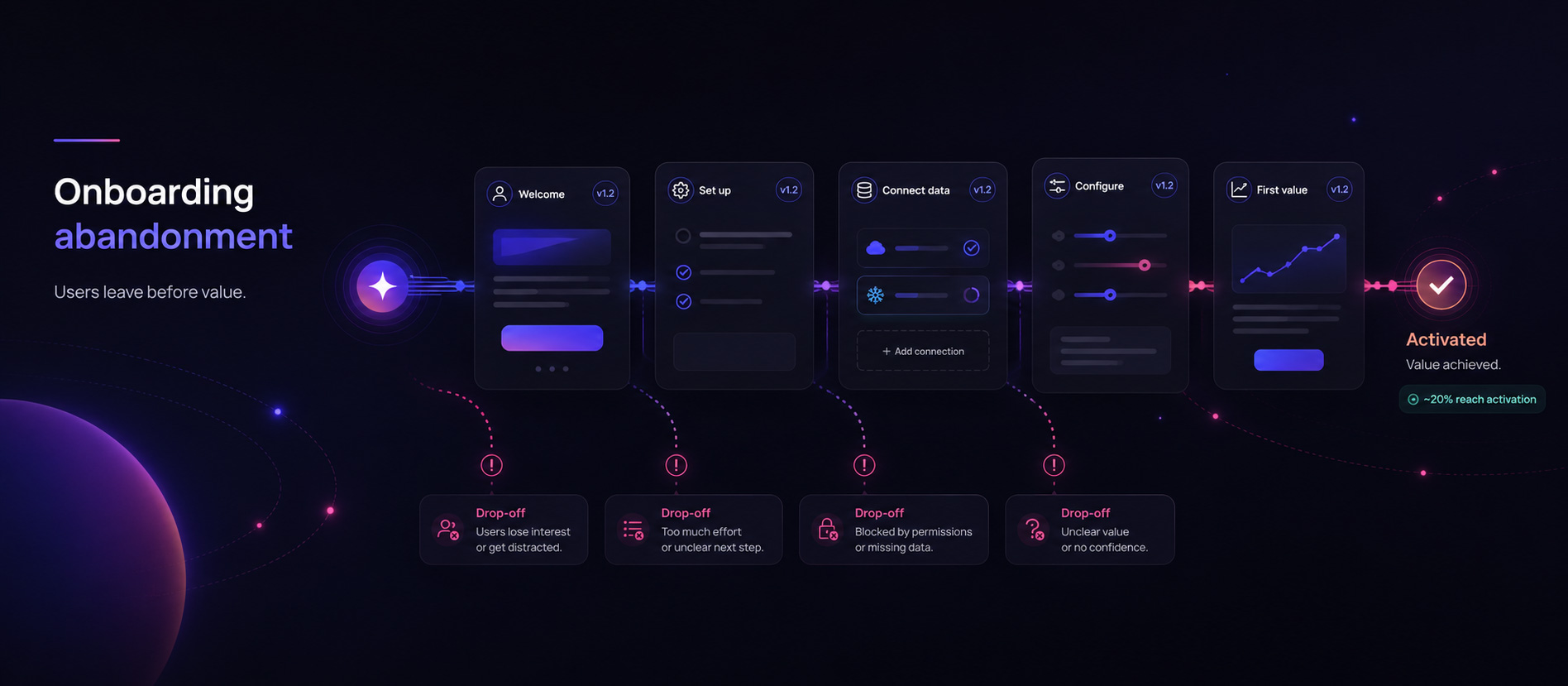
Onboarding abandonment happens when a new user leaves before
                  reaching the meaningful outcome the onboarding was designed to
                  enable. in light mode

Problem

Onboarding abandonment: why users leave before activation

Onboarding abandonment happens when a new user leaves before reaching the meaningful outcome the onboarding was designed to enable.

It is not the same as failing to complete every tooltip, tour, or checklist item. A user can skip part of a prescribed flow and still activate—or complete the entire flow without ever reaching value.

The practical task is to identify which failure stopped progress, then make the smallest credible change that helps users reach value.

Fast recognition
1

What am I supposed to do next?

2

Is this required for setup, or can I do it later?

3

Why does this step need access to my data?

4

What will I be able to do after I finish this?

What onboarding abandonment means

The user leaves before the first meaningful outcome

The important boundary is activation—not whether every designed onboarding step was completed.

An activation event is a product-specific behaviour that shows a new user has experienced the core value of the product for the first time. Depending on the product, that might be publishing a first project, inviting a teammate, importing data, completing a meaningful workflow, or receiving a useful result.

A checklist completion or tour completion can support activation, but it is usually a weaker outcome by itself. Google’s HEART measurement framework recommends mapping product goals to observable signals and meaningful metrics, while the GOV.UK Service Standard advises teams to measure how well a service solves the problem it is intended to solve. For onboarding, that means measuring progress toward first value—not simply whether every piece of guidance was consumed.

That distinction matters because not every exit is a failure. A user might leave a tour to explore the product independently and still activate. Genuine abandonment is the failure to reach the intended outcome within a useful window.

How to measure onboarding abandonment

Measure progress toward value, not only flow completion

No single metric explains the problem. Use a small set of measures that describe whether users reach activation, how long it takes, and where progress stalls.

Activation rate

The proportion of new users who complete the defined activation event within the selected window. The event should represent first meaningful value, not a convenient setup action.

Step-level drop-off

The share of users who move from each meaningful onboarding step to the next. This helps locate the transition where abandonment concentrates.

Time to activation

The elapsed time between signup and activation. A user may eventually activate but still experience enough delay to reduce confidence or return likelihood.

Return and continuation

Whether users return after the first session and resume the activation path. This separates permanent abandonment from delayed completion.

Activation-path feature use

Whether users engage with the features or actions that actually contribute to the first value moment, rather than merely opening onboarding UI.

Segmented outcomes

Activation and drop-off by role, use case, plan, acquisition source, company type, or experience level. One average can hide a flow that works for one audience and fails another.

Google Analytics’ Funnel exploration guidance shows how to analyse the sequence of steps users take toward a task and where they complete or abandon that sequence. Pairing that behavioural view with a goal-to-signal framework such as HEART helps keep activation, time, progression, and quality measures tied to the outcome the product is meant to enable.

Onboarding diagnostic

Check the outcome, the path, and the user’s ability to continue

Do not assume the flow is too long or the copy is unclear until you know which type of failure occurred.

Diagnostic checklist
  • Is the activation event a real first-value outcome rather than a convenient setup milestone?
  • Is every required step necessary before activation, or can some configuration be deferred?
  • Does each step explain what to do, why it matters, and what success looks like?
  • Are prerequisites, permissions, technical requirements, and dependencies visible before the user reaches them?
  • Do important decisions feel reversible, safe, and appropriately timed?
  • Does the flow adapt to the user’s role, goal, experience, or use case?
  • Are errors, slow responses, empty states, or failed integrations blocking progress?
  • Do submitted questions or support messages concentrate around a particular step, term, or decision?

Why onboarding fails

Abandonment has several different causes

The best intervention depends on whether the user lacks value, understanding, confidence, ability, relevance, or a functioning path.

Value failure
The user cannot see why finishing matters or what meaningful outcome will become possible afterwards.
Comprehension failure
Terminology, sequence, prerequisites, or expected outcomes are not clear enough for the user to form a stable mental model.
Confidence failure
A permission request, irreversible choice, data connection, or security-sensitive step feels too risky to continue without more reassurance.
Ability failure
The user lacks required data, access, permissions, technical knowledge, or another dependency needed to complete the step.
Technical failure
Errors, latency, broken integrations, validation problems, or lost progress block an otherwise willing user.
Relevance failure
A generic flow asks users to complete work that does not match their role, objective, plan, or intended use case.
Sequencing failure
The steps might each be understandable, but the order and cause-and-effect relationship between them does not make sense.
Product-fit failure
The product cannot support the user’s intended job. More guidance may temporarily delay abandonment without solving the underlying mismatch.

What it looks like in real questions

The user starts onboarding, then loses the mental model

Submitted questions provide direct evidence about what some users were still trying to understand when progress stalled.

Evidence artifact
Evidence artifact
“What am I supposed to do next—and why?”
  • “Do I need to connect this first, or can I skip it?”
  • “What does this step actually enable?”
  • “Is this required for setup, or just recommended?”
  • “If I choose the wrong option here, can I change it later?”

Different wording; a shared uncertainty about sequence, value, and risk.

Quantitative evidence shows where
Funnels, event data, activation rates, time to value, errors, and segmented outcomes show where abandonment concentrates and how large the affected group is.
Behavioural evidence shows what happened
Session replay, retries, backtracking, idle time, repeated clicks, and validation failures provide clues about the immediate behaviour.
Expressed uncertainty shows what some users needed
Questions, support messages, search terms, and survey responses can reveal missing explanations, unclear value, risky decisions, or unmet expectations.

How to diagnose onboarding abandonment

Move from the funnel leak to a specific failure hypothesis

Combine product data, technical evidence, and direct user input before changing the flow.

1

Define the activation outcome

Identify the first behaviour that demonstrates meaningful product value and has a credible relationship with later retention or successful use.
2

Map the minimum path to activation

Separate steps that are truly required from configuration, education, or personalisation that can happen later.
3

Instrument every meaningful transition

Track entry, completion, failure, abandonment, and recovery across the activation path—not only the final conversion.
4

Find the highest-impact drop-off

Prioritise by affected volume, proximity to value, consequence, and whether the step blocks important segments.
5

Segment the affected users

Compare role, use case, experience, plan, traffic source, device, and other context to test whether the failure is universal or specific.
6

Inspect behaviour and technical state

Review errors, retries, time spent, backtracking, session evidence, and any lost or incomplete product state around the step.
7

Review questions and direct feedback

Look for the original language users use to describe unclear value, missing prerequisites, risk, sequence, and expected outcomes.
8

Classify the failure mode

Decide whether the main issue is value, comprehension, confidence, ability, technical reliability, relevance, sequence, or product fit.
9

Choose the smallest credible intervention

Make a focused change that directly addresses the evidence rather than redesigning the complete onboarding flow.
10

Measure activation again

Compare the relevant segment and activation outcome after the change. Treat observational movement carefully unless the team runs a controlled experiment.

How to reduce onboarding abandonment

Match the intervention to the failure

There is no universal onboarding fix. Reduce the specific uncertainty, effort, risk, or technical barrier shown in the evidence.

When value is unclear

Demonstrate a useful result earlier, show progress toward first value, and remove feature education that does not contribute to the activation outcome.

When the flow asks too much

Remove non-essential fields, defer advanced configuration, provide defaults or templates, and prefill information already known.

When the next step is unclear

Present one clear action, explain why it matters, expose prerequisites, and show the expected result before asking users to continue.

When choices feel risky

Explain permissions and consequences, state whether the choice is reversible, and provide a safe recommended default where appropriate.

When users need different paths

Segment by objective, role, experience, plan, or company type and route users toward the activation path that matches their job.

When the flow technically fails

Instrument errors, preserve progress, support recovery, explain validation failures, and provide an escalation path without forcing the user to restart.

When sequence is the problem

Reorder steps around dependencies and visible cause-and-effect. Explain why one step must happen before another.

When the product does not fit

Do not add more onboarding. Qualify expectations earlier, change the activation promise, or address the product gap itself.

The W3C guidance on clear process steps recommends making the current step, important choices, and the path through a process understandable. The GOV.UK Service Standard likewise advises teams to begin with the user’s problem rather than a preferred solution. Together, those principles support diagnosing the specific failure, reducing only the effort or uncertainty that blocks progress, and validating the result against the intended user outcome.

What not to optimise blindly

A smoother flow can still produce the wrong outcome

Protect the activation goal from proxy metrics that are easy to improve but weakly connected to value.

Tour or checklist completion
Completion can increase because users click through guidance faster, even if they remain unable to use the product successfully.
Every onboarding exit
Some users leave a prescribed path to explore independently. Judge whether they activate, not whether they obey the designed sequence.
Step count in isolation
Fewer steps can help, but removing context, reassurance, or required setup can make the remaining flow less effective.
One average across all users
A healthy overall activation rate can conceal severe abandonment for a strategically important segment.
Activation without later quality
An activation definition that rises while meaningful use or retention remains weak may be measuring the wrong behaviour.
Questions without behavioural context
A question is evidence of uncertainty, not proof that it caused abandonment. Review it alongside product behaviour, technical state, and segment context.

How Sol Helps supports the investigation

Add the questions users submit while they are still trying to activate

Sol Helps complements funnels, replay, and support data by preserving the original question, answer context, and page or path evidence behind recurring onboarding uncertainty.

Capture questions inside the onboarding experience
An inline or floating help widget lets users submit questions on customer-facing onboarding, documentation, and product pages. Logging depends on plan, configuration, and consent conditions.
Preserve useful context with the conversation
Where available, conversation evidence can retain host, path, URL, referrer, campaign, locale, session, install, and widget context so teams can investigate where the question arose.
Inspect the original wording and answer
Captured Questions lets authenticated users search and filter raw conversations, review messages, feedback, unanswered state, notes, and conversation-level review status.
See recurrence and directional priority signals
Insights aggregates broad rule-based themes and can expose counts, share, follow-up and negative-feedback rates, recency, impact and confidence heuristics, top phrases, representative evidence, and page or surface context.
Filter, review, and hand off evidence
Teams can filter available views by dimensions such as assistant, date, topic, review status, host, path, campaign, widget version, or selected theme, then copy, share, export eligible data, or send a configured generic webhook handoff.
Revisit later periods
Eligible plans can compare a selected period with the preceding window, helping teams observe whether the same broad pattern changes after an onboarding update.

What to do next

Audit one high-impact pre-activation drop-off

Start with a bounded problem and classify the failure before changing the complete onboarding experience.

Pick the highest-impact step before activation. Confirm the intended outcome, identify the users affected, inspect what happened immediately before they left, and collect the questions or feedback associated with that step. Then decide whether the failure is value, comprehension, confidence, ability, technical reliability, relevance, sequence, or product fit.